To debug issues with your OAuth implementation, you can enable verbose logging and review the messages for details regarding data exchanges and possible errors in your system.
To enable verbose OAuth logging, open the log.config file in the Website folder in your implementation's installation folder. In the <appender> section of the log file, locate the filter entry that contains the <LoggerToMatch value="OAuth.Verbose" /> key-value pair.
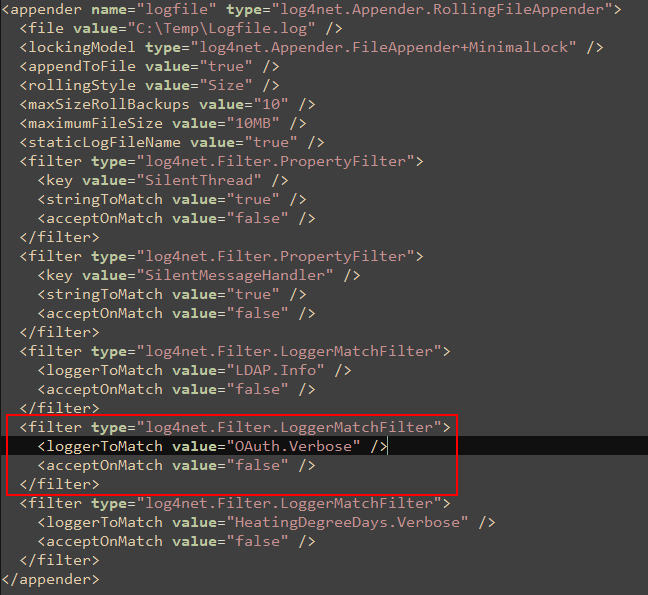
OAuth Verbose Logging Filter Entry
To deactivate the filter and activate verbose logging, it is recommended that you comment out the filter entry above by adding <!-- to the beginning and --> to the end of the section.
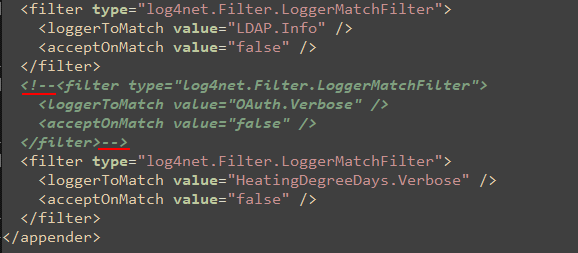
OAuth Verbose Logging Filter Entry Commented Out
Depending on your system and the <appender> section used, you may need to comment out more than one filter containing a <LoggerToMatch value="OAuth.Verbose" /> key-value pair.
Verbose logging is activated when you save the log.config file after making the changes outlined above. To access the logs, open the file specified in the file value in the <appender> section.

File and Path for Verbose Logging