Refer to Maintenance Strategy Details for information about the fields on the form for creating a new maintenance strategy.
Create a Maintenance Strategy
You can create a maintenance strategy on the device details page, component details page, type details page, vehicle details page, or vehicle type details page, depending on the range of assets for which you want the maintenance strategy to generate orders. If you create a maintenance strategy on the type details page, it can generate orders for all (or multiple specific) devices or components in the type. If you create the maintenance strategy page on the details page for an individual asset, it will generate orders for that asset but not for other assets in the type.
This procedure only applies if you are creating a maintenance strategy to generate orders for assets in VertiGIS FM Maintenance, including the Fleet Management module. For instructions on how to create maintenance strategies for other types of assets, click here.
Create a New Maintenance Strategy
1.Navigate to the details page for the individual asset or type to which you want to apply the maintenance strategy.
2.In the Maintenance Strategies section, click the Add ( ) icon.

3.In at least one of the Name text boxes, enter a name for the maintenance strategy for the corresponding language.
4.From the Mode drop-down menu, select an option to designate the maintenance strategy as mandatory or optional. If you are adding the maintenance strategy at the type level and select Required for this field, the maintenance strategy will be applied to all assets associated with the type.
5.In the Maximum number of appointments text box, type a number to designate how many orders VertiGIS FM Maintenance will generate in advance for the asset. If you leave this field blank, a default of 1 will be generated.
6.In the Maximum period for dates field, select the check box and enter how far into the future you want VertiGIS FM Maintenance to generate appointments. Whereas the Maximum number of appointments field limits how many orders in advance the system generates, the Maximum period for dates field limits how far into the future (for example, 2 months or 3 years) the system generates orders.
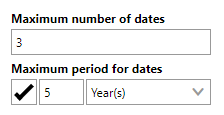
Refer to Maintenance Strategy Details for an overview of all form fields.
7.Click Save and Close.
The maintenance strategy now has its own details page, which appears when you click Save and Close on the form for the new maintenance strategy.
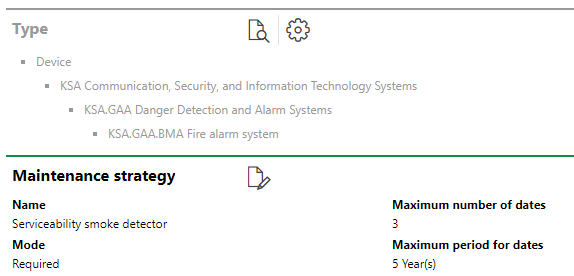
Maintenance Strategy Details Page
Additionally, the Maintenance Strategies section on the asset's or type's details page now reflects the maintenance strategy you created.

Maintenance Strategies Section
When you have saved the new maintenance strategy, you can now add intervals to it.