To ensure your web server is properly configured for authentication via OAuth, complete the sections below in Internet Information Services (IIS).
Maximum Query String
In IIS, configure the web server to accept query strings longer than 2048 characters in length. Otherwise, IIS may block responses from authentication servers.
To Configure the Web Server Maximum Query String
1.Open Internet Information Services (IIS).
2.Select the server in the left pane.
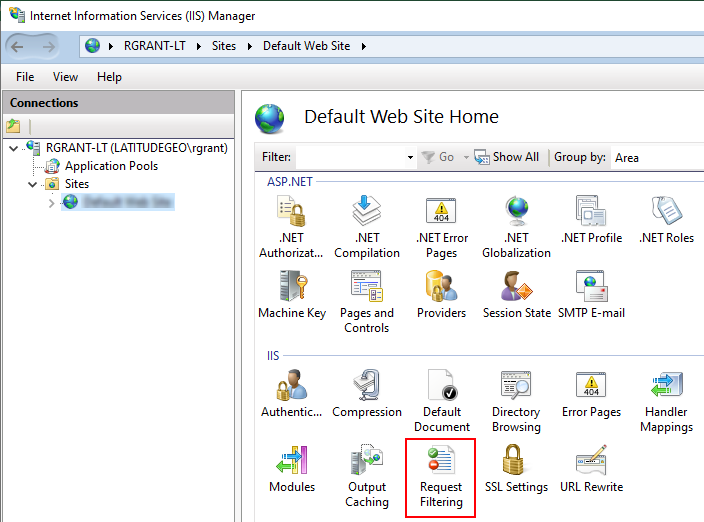
3.Under IIS, double-click Request Filtering.
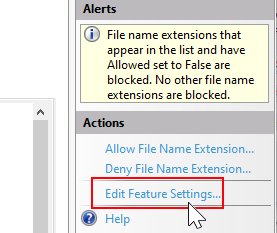
4.Under Actions, click Edit Feature Settings.
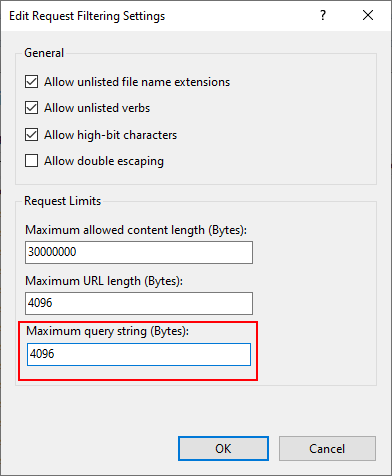
5.In the Maximum Query String (Bytes) box, enter a value of 4096 (or higher).
6.Click OK.
Application Host URL
VertiGIS FM recommends you ensure the application web host URL is set correctly before your users can authenticate using OAuth.
To Ensure the Application Host URL Is Correctly Set
1.Open Internet Information Services (IIS).
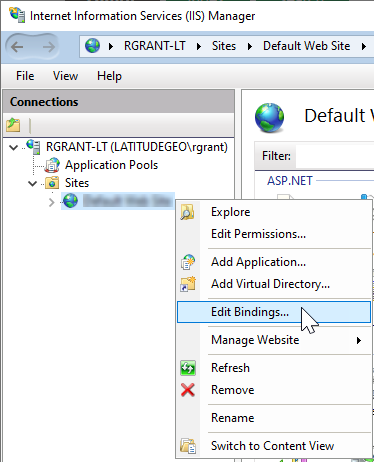
2.Right-click the server in the left pane and select Edit Bindings.
3.Ensure a binding with the settings below exists on the server. You can click Add to add a new binding, or select a binding and click Edit to edit an existing one.
▪Type: https
▪IP Address: *
▪Port: 44368
▪SSL Certificate: Select the certificate retrieved from Microsoft certificate store.
4.Click OK if you added or edited a binding.
5.Click Close.text here.